
Best Anki Settings for the MCAT (2026 FSRS Guide)
By Dr. Sarah Johnson • Updated 9/3/2026
Short answer: turn FSRS on, set desired retention to 0.90, keep every learning step under one day, and cap new cards at 20 to 30 per day. Then stop, because most of the other settings no longer do anything.
That last part is where nearly every MCAT Anki guide goes wrong, including one of ours.
Anki replaced the scheduling algorithm. The settings that used to matter, graduating interval and easy bonus and starting ease, are now inert for anyone running FSRS. Guides written against the old scheduler still tell you to tune them, and tuning them does nothing at all.
There is a second problem, and it is bigger: FSRS is still not on by default. A lot of 2026 pages claim it has been the default since Anki 23.10. We checked Anki’s source code, and that is not true.
The 30-second answer: Deck Options, scroll to FSRS, toggle it on, click Optimize, set desired retention 0.90. Learning steps 10m. Relearning steps 10m. New cards/day 20 to 30. Maximum reviews/day 9999. Maximum interval about half the days left until your test. Ignore every other interval setting.
In this guide
- Anki ships with FSRS turned off
- Five settings that stop working
- Learning steps: the advice that is now wrong
- Desired retention, the only real dial
- New cards per day: the arithmetic
- Maximum interval, the MCAT-specific setting
- Easy Days and your full lengths
- The habit no setting can fix
- Every setting in one table
Anki Ships With FSRS Turned Off
FSRS, the Free Spaced Repetition Scheduler, predicts your forgetting curve per card instead of applying the fixed multipliers the legacy SM-2 algorithm used. For a deck the size of an MCAT deck, it is the single highest-leverage change you can make.
It has been bundled with Anki since version 23.10. Bundled is not the same as enabled.
We checked this in Anki’s source rather than trusting the secondary sources, because they disagree. In rslib/src/config/bool.rs, the function that reads boolean settings lists the keys that default to on. It names things like the load balancer and the FSRS health check. The Fsrs key is not in that list, so it falls through to the default of off. The only place the flag gets written outside of tests is the deck options save handler, which runs when a person toggles it by hand.
The upstream issue asking to flip this, ankitects/anki#3616, “Make FSRS the default?”, is still open. Current stable is 26.08.
Check yours right now: open Deck Options and scroll to the bottom. If there is a section called FSRS with an unchecked toggle, you have been on the legacy scheduler this whole time. Turn it on, then click Optimize under FSRS parameters. If Anki says the parameters already look optimal, that is fine and expected on a young deck.
One quirk worth knowing: FSRS can only be enabled globally. You cannot run it on your biochem preset and not your psych/soc preset. Desired retention and the parameters themselves, however, are per-preset, so you can still tune sections differently.
Five Settings That Stop Working Once FSRS Is On
The moment you enable FSRS, Anki hides a block of settings. The manual is direct about it: when you turn FSRS on, “SM-2 specific options, such as Graduating interval, Easy bonus, etc. are hidden” (Anki manual).
The FSRS documentation is blunter still. “Anki’s built-in ease factor doesn’t affect anything once FSRS is enabled” (fsrs4anki).
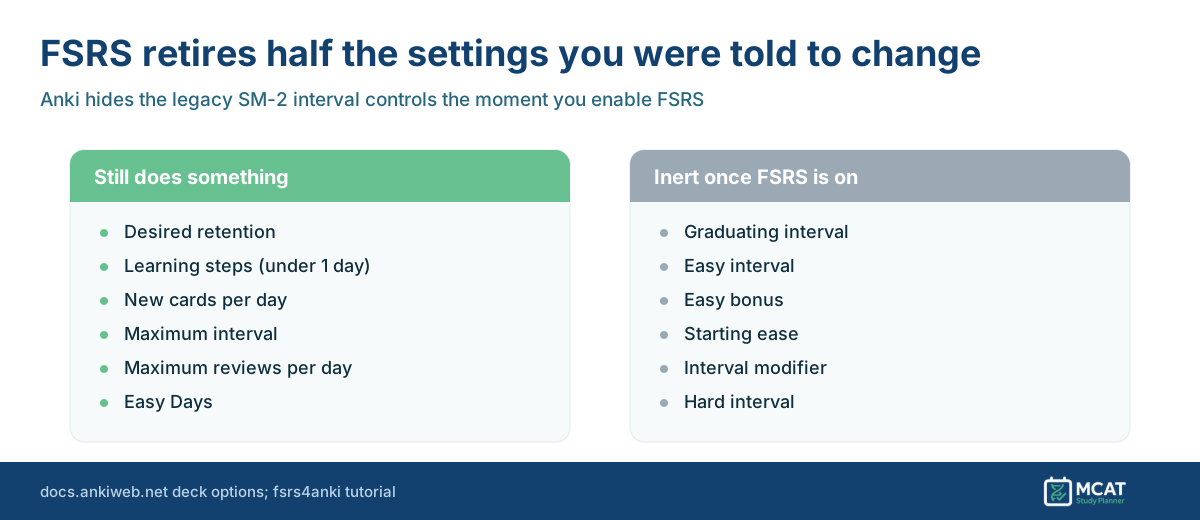
So if a guide tells you to set your graduating interval to 4 days and your easy interval to 7 days, that guide is describing a version of Anki you are not running. Those fields are not even visible.
This includes our own older Anki guide. Our how to use Anki for the MCAT walkthrough recommends a graduating interval of 4 days, an easy interval of 7 days and ease-factor tuning. That advice was correct for SM-2 and is dead weight under FSRS. We are updating it to point here.
Learning Steps: The Advice That Is Now Explicitly Wrong
This is the one that actively damages your scheduling rather than merely wasting your time.
The single most repeated MCAT Anki recommendation is to set learning steps to something like 15m 1d 3d, on the logic that you want to test recall after a night of sleep. Under FSRS, the manual contradicts this in one sentence:
(Re)learning steps of 1 day or greater are not recommended when using FSRS.
It goes further on the mechanics. “Ensure that all your learning and re-learning steps are shorter than 1d and can be completed on the same day. 23h is not recommended even though it’s less than one day because you won’t be able to finish this step on the same day as your first review. Steps such as 10m or 30m are good.”
The reason is that FSRS wants to take over as soon as possible. Long learning steps keep a card trapped in the learning queue where FSRS’s model has no say, so you get worse scheduling than if you had left it alone.
Set learning steps to 10m and relearning steps to 10m. One step each is enough. If you want a second, make it 15m then 10m. Anything measured in days is working against the algorithm.
Desired Retention Is the Only Dial Worth Tuning
Anki’s manual calls it “the most important setting in FSRS,” and it is the only number in this article that genuinely deserves your deliberation.
Desired retention is the fraction of cards you want to successfully recall when they come due. The default is 0.90, meaning you accept forgetting roughly one card in ten at review time. Push it up and intervals shorten, so you see cards more often and remember more. Push it down and you study less and forget more.
The permissible range is 0.70 to 0.99, but the manual is explicit about where the cliff is: “Above 90% the workload increases very quickly, and above 97% the workload can be overwhelming.” It recommends keeping it below 97%.
Start at 0.90 and leave it there for the bulk of your prep. In your last three or four weeks, moving to 0.92 or 0.93 is a defensible trade if your review load has room, since you are optimizing for recall on one specific day rather than for efficiency. That final adjustment is our judgment call rather than a documented recommendation, and it costs you review time, so make it only if you have the hours.
One stale-guide trap: several pages still tell you to click Compute Minimum Recommended Retention to pick this number. That feature was removed in Anki 25.07. The manual now heads the section “Compute Minimum Recommended Retention (<25.07)” and states the feature has been removed, though confusingly its own FSRS setup steps still reference it.
New Cards Per Day: The Arithmetic Nobody Shows You
Every guide gives a number. None of them show what the number costs. The recommendations range from 15 to 100 new cards per day, which is not a disagreement about preference, it is a disagreement about an hour and a half of your day.
Anki’s manual publishes the ratio that settles it:
If you are consistently learning 20 new cards a day, you can expect your daily reviews to be roughly about 200 cards/day.
That is a 10:1 steady state. It assumes open-ended study, where cards eventually reach very long intervals. On an MCAT timeline they never get there. Under FSRS at 0.90 retention, post-graduation intervals run roughly 1 to 2 days, then 3 to 4, then 8 to 10, then 20 to 25, then 50 to 60. Inside a three-month window an early card takes about six review touches and a late one takes three.
So we use six, not ten. That is our calculation, not Anki’s published figure, and it is the conservative end.
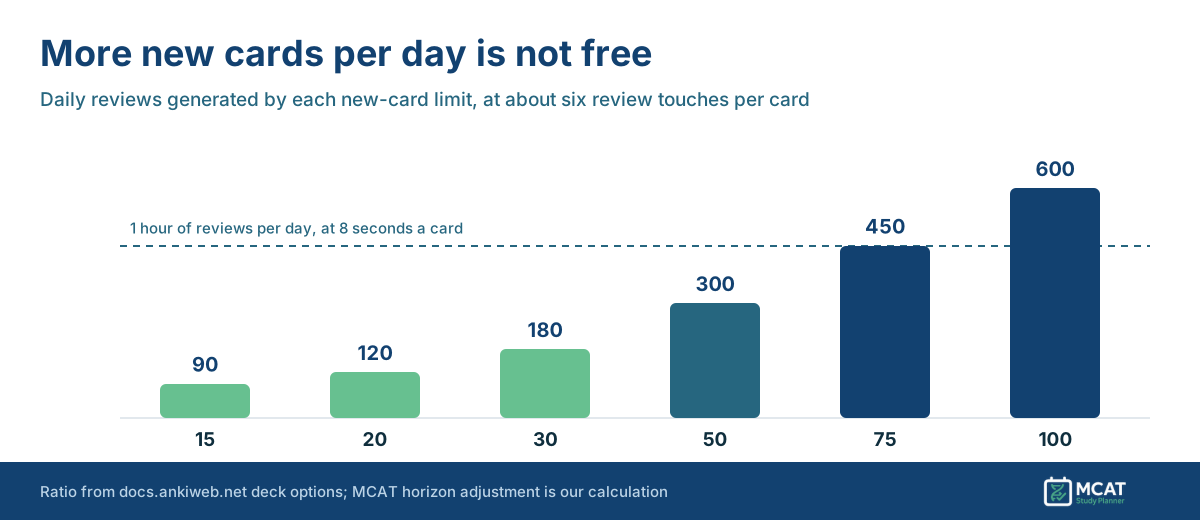
| New cards/day | Daily reviews | Reviews time | Total Anki time |
|---|---|---|---|
| 15 | 90 | 12 min | ~18 min |
| 20 to 30 | 120 to 180 | 16 to 24 min | ~25 to 37 min |
| 50 | 300 | 40 min | ~61 min |
| 75 | 450 | 60 min | ~91 min |
| 100 | 600 | 80 min | ~122 min |
Those minute figures assume 8 seconds per review card and 25 seconds per new card. Your pace will differ, so rescale them. Anki also ships a Simulator in deck options that estimates your workload “either in reviews per day or in minutes of studying per day” against your actual deck, which beats any table on a blog including this one.
The conclusion is hard to argue with once the numbers are in front of you. At 75 to 100 new cards per day you are spending 1.5 to 2 hours daily on flashcards. For a student studying five hours a day, that is a third of your prep going to recognition drilling instead of practice passages, which is the classic way to plateau at 508.
Our own Anki decks roundup suggests 20 to 30 per day and that number holds up. The 75 to 100 figure in our older how-to does not, and we are correcting it.
Maximum Interval: The One Genuinely MCAT-Specific Setting
Anki defaults maximum interval to 100 years. That default is built on an assumption that does not apply to you: that you want to retain this material indefinitely.
You need to know it on one Saturday morning.
If a card earns a 120-day interval in February and you test in May, FSRS will not show you that card again before test day. It is behaving correctly by its own objective. It is just not your objective.
The manual supports the fix directly, noting you can “decrease this to a smaller number if you’re willing to trade extra study time for higher retention.”
Set maximum interval to about half the days left until your test. Three months out, use 45. Six months out, use 90. This guarantees every card resurfaces at least once more before test day. Lower it again as your date approaches. Framing the setting this way is ours; the setting and the tradeoff are documented.
The longer your timeline, the more this setting is doing. On a 24-week plan the earliest cards have 168 days to drift, which is why our 6-month MCAT study schedule pairs the 90-day cap with stopping new cards entirely once the practice block starts.
While you are in that section, set Maximum reviews per day to 9999. The manual notes that when the cap is hit, Anki simply stops showing review cards for the day and hides the rest. A hidden backlog is still a backlog, and it will surface later as a wall. If your daily load is too high, the fix is fewer new cards, never fewer reviews. That piece of the conventional advice is still correct.
Easy Days: Schedule Anki Around Your Full Lengths
This one is underused and fits MCAT prep unusually well.
Easy Days lets you tell Anki to go lighter on specific weekdays. If you take your full lengths on Saturdays, and you should be taking them on a fixed day, set Saturday to Reduced or Minimum. Anki nudges intervals so fewer cards land there, and you get your test-day simulation without 300 reviews on top of a seven-hour exam.
It works with both FSRS and the legacy scheduler. Two caveats from the manual: setting every day to Reduced is identical to setting every day to Normal, since it is relative, and changes only affect future intervals, so you will not see the effect immediately.
Pair this with a real exam calendar. Our full-length calendar maps which week each official exam belongs in.
The Habit No Setting Can Fix
FSRS adapts to almost anything you do. The manual identifies exactly one habit it cannot absorb, and it is common:
FSRS can adapt to almost any habit, except for one: pressing “Hard” instead of “Again” when you forget the information.
When you press Hard, FSRS records a success that took effort. If you actually blanked, you have told the model you remembered something you did not, and as the manual puts it, “all intervals will be unreasonably high.”
If you failed to recall it, press Again. Hard means you got there slowly. This matters more than every setting above combined, because it corrupts the data the algorithm learns from.
One related rule: the manual advises that if an add-on affects intervals or scheduling in any way, do not run it alongside FSRS.
Every Setting In One Table
| Setting | Set it to | Why |
|---|---|---|
| FSRS | On, then Optimize | Off by default; the highest-leverage change available |
| Desired retention | 0.90 | Workload climbs steeply above this |
| Learning steps | 10m | Steps of 1 day or more are not recommended under FSRS |
| Relearning steps | 10m | Same rule applies |
| New cards/day | 20 to 30 | Keeps total Anki time near 30 minutes |
| Maximum reviews/day | 9999 | Capping hides a backlog rather than removing it |
| Maximum interval | Half your days remaining | You need recall on one date, not forever |
| Easy Days | Reduce your full-length day | Stops reviews stacking on exam days |
| Graduating / easy interval, easy bonus, starting ease, interval modifier | Ignore | Hidden and inert once FSRS is on |
Turning This Into an Actual Schedule
Settings decide how efficient your reviews are. They do not decide whether Anki fits in your week, and that is usually the real constraint.
Thirty new cards a day is about 35 minutes. Fit that against the rest of your prep before you commit to it, because it competes directly with practice passages. If you are still working out the total, our analysis of real MCAT study hours covers the budget, and the 10-week content review plan shows where flashcards sit next to everything else.
When you are ready to put it on a calendar, our free MCAT study schedule generator builds a plan around your test date and the hours you actually have, so your Anki load and your practice load are scheduled against each other rather than competing for the same evening.
Written by
Dr. Sarah Johnson
Last updated 9/3/2026